
Phone Skope: Camera app with s1.10.8 - Google Play
You'll be able to see results in few seconds.
Publisher Description
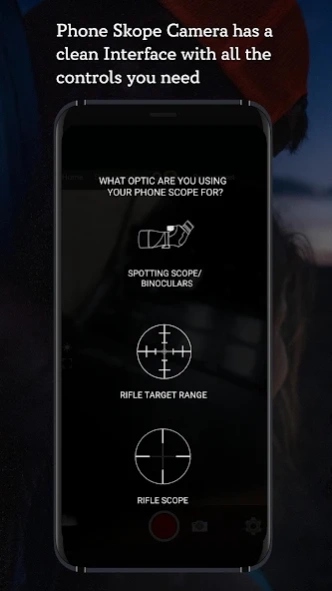
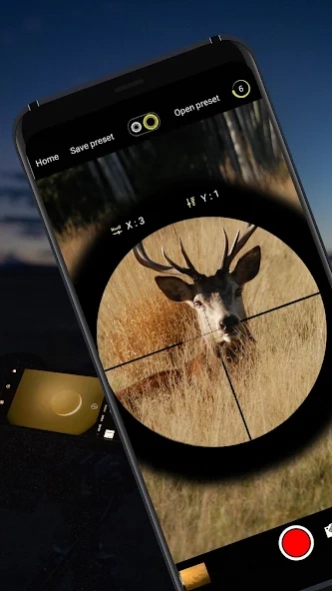
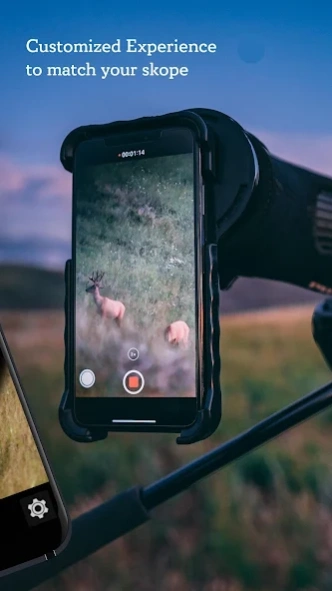
Camera app that records live 360, 4k, slow motion, time lapse & rotated videos
Phone Skope is an exciting new camera app that allows users to take better pictures and videos. You can now take pictures and record videos like a professional photographer by using Phone Skope’s multiple features that will equip you with all the right tools and techniques. The 4k camera and live 360’ make it the best camera app for android devices. If you are passionate about photography and want to use your phone to take the best pictures anytime, anywhere, Phone Skope is just the app for you. Whether you are interested in wildlife photography or you are a nature lover or just like taking pictures of anything that pleases your heart, Phone Skope will equip you with all the right tools and techniques to make your photography even better!
The Phone Skope Camera App allows users a greater control over their camera. The app offers many interesting camera features such as the ability to rotate your camera up to live 360’ degrees, zoom in magnification that is six times greater than your phone camera, slow motion and time-lapse videos, a complete manual control over focus, light (brightness and contrast), quality, size and much more. You can select and save your desired features and use them every time you wish to use Phone Skope to take a picture or record a video.
Features and functions
4k Video - The app allows users to record videos with a 4k resolution!
Slow motion - The app lets users record videos in slow motion, which means capturing numerous frames per second!
360’ Camera live - This feature makes your camera swing on a complete 360’ angle and capture everything!
Zoom -The app allows a magnified zoom, almost six times greater than a phone’s original camera.
Time-lapse video - Users can use this feature to capture time-lapse videos to record a transition of a certain event and display it in a short video.
Manual controls - Users can alter multiple features in the app manually such as, brightness, contrast, focus, quality, size and many more.
Mirror Video - The app mirrors live videos while recording, allowing users to see what a video will look like once recorded.
Add-ons - Users may use external skopes
Rotation of video: Our app is the only app in store that offers video and image rotation at all angles from 0 to 360. All other apps in store are only offering rotation at 0, 45, 90, 180 and 360 degree.
Camera 1 and 2 API support: Our app support both legacy and new phones.
What’s New
Screen rotation lock while recording
We have introduced a new button to lock & unlock button that allows controlling screen orientation manually. This allows users to work freely with no unwanted rotation of screen, if the device requires to be moved while working.
Manual Video / Image Brightness Control
We have also introduced a new feature at the bottom of the app, an icon for controlling the brightness of your screen manually. A user may select their desired level of brightness for their screen; however, this will not impact the brightness of their captured images and videos!
The app is free for all users so install now and channel your inner photographer!
About Phone Skope: Camera app with s
The company that develops Phone Skope: Camera app with s is PhoneSkope. The latest version released by its developer is 1.10.8.
To install Phone Skope: Camera app with s on your Android device, just click the green Continue To App button above to start the installation process. The app is listed on our website since 2019-04-12 and was downloaded 0 times. We have already checked if the download link is safe, however for your own protection we recommend that you scan the downloaded app with your antivirus. Your antivirus may detect the Phone Skope: Camera app with s as malware as malware if the download link to com.phonescope.camera is broken.
How to install Phone Skope: Camera app with s on your Android device:
- Click on the Continue To App button on our website. This will redirect you to Google Play.
- Once the Phone Skope: Camera app with s is shown in the Google Play listing of your Android device, you can start its download and installation. Tap on the Install button located below the search bar and to the right of the app icon.
- A pop-up window with the permissions required by Phone Skope: Camera app with s will be shown. Click on Accept to continue the process.
- Phone Skope: Camera app with s will be downloaded onto your device, displaying a progress. Once the download completes, the installation will start and you'll get a notification after the installation is finished.
Program Details
System requirements
Download information
Pricing
Version History
version 1.10.8
posted on 2019-04-12
Screen rotation lock
We have added a new button to lock and unlock the screen orientation manually, this will prevent unwanted rotation of screen if the device orientation will on.
Screen Brightness
No bottom of the app has a new icon for controlling the brightness of a screen manually. The user will be able to set device screen brightness LOW and HIGH manually, it will not effect on capture preview brightness.
Disclaimer
Official Google Play Link
We do not host Phone Skope: Camera app with s on our servers. We did not scan it for viruses, adware, spyware or other type of malware. This app is hosted by Google and passed their terms and conditions to be listed there. We recommend caution when installing it.
The Google Play link for Phone Skope: Camera app with s is provided to you by apps112.com without any warranties, representations or guarantees of any kind, so access it at your own risk.
If you have questions regarding this particular app contact the publisher directly. For questions about the functionalities of apps112.com contact us.
